
Terragrunt: What It Solves, What It Costs
A practical walkthrough for teams wondering if they need a Terraform wrapper

I‘ve been learning Terragrunt recently. Like most tools I pick up, I wanted to understand not just how to use it, but why it exists and what problems it’s actually solving.
To do that, I needed to revisit some Terraform fundamentals first, specifically the friction points that show up as infrastructure grows. So this article starts there, then walks through Terragrunt’s core concepts, how they fit together, and where the trade-offs are.
This is a longer one, so settle in with a hot beverage.

0. The foundation: Terraform basics we need first
This is section 0 because Terragrunt isn’t a standalone tool; it’s a layer on top of Terraform. You can’t understand Terragrunt without understanding what Terraform does and where it falls short.
If you're already comfortable with Terraform basics (resources, modules, state), skip ahead to "Some Terraform limitations".
What Terraform does
We write .tf files that describe infrastructure we want (an S3 bucket, a VPC, a database).
We run terraform apply, and Terraform talks to AWS (or any cloud provider) to create it. If we run terraform apply again, and Terraform checks what changed and only updates the diff.
So that we don’t risk doing unintended changes, it’s common we use terraform plan before terraform apply. This way we “plan” the changes that will be applied first (so we get a visibility of what new infra we’re adding/changing/deleting)
Resources
Resources are the building blocks of Terraform. This is how we declare the individual infrastructure things we want to exist (a server, a bucket, a database):
resource "aws_instance" "web" {
  ami           = "ami-0c55b159cbfafe1f0"
  instance_type = "t2.micro"
}
References and automatic dependency ordering
Resources in Terraform can reference each other. When they do, Terraform automatically figures out the order:
resource "aws_security_group" "web_sg" {
  name = "web-sg"
  # ... rules ...
}

resource "aws_instance" "web" {
  ami                    = "ami-0c55b159cbfafe1f0"
  instance_type          = "t2.micro"
  vpc_security_group_ids = [aws_security_group.web_sg.id]  # ← reference
}
Because the instance references the security group’s ID, Terraform knows to create the security group first. We don’t specify ordering; Terraform builds a dependency graph and works it out. It even parallelises where it can.
Modules (reusable patterns)
When we find ourselves writing the same config for dev, staging, and prod, we extract it into a module, which is a reusable template of .tf files with variables. We define the pattern once, then use it multiple times with different inputs.
# modules/vpc/main.tf
resource "aws_vpc" "this" {
  cidr_block = var.cidr_block
}

# modules/vpc/variables.tf
variable "cidr_block" { type = string }

# modules/vpc/outputs.tf
output "vpc_id" { value = aws_vpc.this.id }
Then we use it:
module "vpc" {
  source     = "./modules/vpc"
  cidr_block = "10.0.0.0/16"
}
⭐ State files (Terraform’s memory)
Every time Terraform creates something, it writes a terraform.tfstate file (a JSON map between our code and the real world). When we later run plan or apply, Terraform reads this file, checks the actual state in AWS, and figures out what changed (and shows us the diff).
For solo use, a local state file is fine. For teams, we store it remotely (typically S3 + DynamoDB for locking - more on this below) so everyone shares the same source of truth and two people can’t apply simultaneously.
Without the state file, Terraform has no idea what it previously created.
Some Terraform limitations
As our infrastructure grows (multiple environments, multiple AWS accounts, hundreds of components), a few rough edges emerge:
State organisation and backend repetition
In regular software development, we don’t put our entire application in one file. We split it into modules, packages, and services so that each piece is easier to reason about, test, and deploy independently
The same principle applies to infrastructure. We want to split our infra into separate state files so that each one is small, focused, and safe to change without risking unrelated resources. We might split by environment (dev/staging/prod), by domain (networking, data, compute), by team (platform, application), or by service (auth-service, payments-service). How granular we go depends on how our organisation works
In Terraform, each of these separate pieces needs its own backend block - the config that tells Terraform where to store its state file (which S3 bucket) and what to name it (the
key). We have to manually set a uniquekeyfor every single one. If we copy the same key twice by accident, one module silently overwrites another’s state file
No way to orchestrate across state files
Once we’ve split into separate state files (which is the right thing to do), we lose two things:
We can’t deploy an environment with one command anymore → we have to
cdinto each folder andterraform applyone by one, in the right order (VPC before database, database before app)Our app can’t just reference
aws_vpc.main.id→ that resource lives in a different state file that Terraform doesn’t know about
Lots of config duplication
Our dev, staging, and prod VPCs use the same module with slightly different inputs, but each needs its own complete set of
.tffiles (provider config, backend config, module block, variables). Most of it is identical.
This is where Terragrunt comes in. Terragrunt features solve the above problems (e.g. DRY configs, auto-generated state keys, dependency blocks, etc.)
How teams solve these with vanilla Terraform
Before reaching for another tool, it’s worth understanding the workarounds Terraform provides natively, and where they fall short.
Partial backend configuration
Terraform lets us leave the backend block mostly empty and pass settings via
terraform init -backend-config=backend.hcl. Here’s how it works in practice. We create one shared file with the common settings:# backend.hcl (shared across all modules) bucket = "my-company-terraform-state" region = "ap-southeast-2" dynamodb_table = "terraform-locks" encrypt = true
Then in each root config
.tffile, we only specify the uniquekey:# dev/vpc/main.tf terraform { backend "s3" { key = "dev/vpc/terraform.tfstate" } } # dev/database/main.tf terraform { backend "s3" { key = "dev/database/terraform.tfstate" } }
Terraform merges the two, the shared settings from
backend.hclplus thekeyfrom the.tffile — and stores each root config’s state as a separate object in the same S3 bucket. So multiple state files, each one is just a differentkey(path) within the bucket. Our bucket might end up looking like:my-company-terraform-state/ dev/vpc/terraform.tfstate dev/database/terraform.tfstate dev/app/terraform.tfstate prod/vpc/terraform.tfstate prod/database/terraform.tfstate ...We’d still need to enter a
keymanually, which carries a bit of risk about copy/pasting a key from another file, and overwriting the state.Workspaces
Terraform workspaces let us maintain separate state files within a single configuration directory (one workspace per environment). The appeal is obvious: one copy of our code,
terraform workspace select dev, and we’re deploying to devBut workspaces have real limitations. They share the same backend (we can’t put dev state in one S3 bucket and prod in another). Environments aren’t visible in our repo; they only exist as CLI state, so it’s hard to see what’s deployed where. (Terraform Cloud improves this with a UI, access controls, and run history per workspace, but that’s a paid product, and the other limitations around shared backends still apply) Even HashiCorp’s own docs say workspaces are not recommended for environment separation: “Workspaces alone are not a suitable tool for system decomposition.”
Separate directories per environment
The most common approach is creating a directory per environment (e.g.,
dev/,staging/,prod/) each with its own.tffiles, backend config, and variable valuesThis gives us proper isolation, where each environment is explicit, visible, and self-contained. But it also means copying provider blocks, backend blocks, and module calls across every directory. Change the S3 bucket name? Update it in every directory. Add a new module? Copy the boilerplate into every environment
Wrapper scripts and Makefiles
To glue all this together, teams often write Bash scripts or Makefiles that
cdinto directories, runterraform initwith the right flags, apply modules in the right order, and pass outputs between themThis works, but we’re now maintaining custom orchestration logic alongside our infrastructure code
Each of these approaches solves part of the problem, but none solves all three friction points cleanly.
So... do we actually need another tool?
Like any software product, Terraform has limitations, and like any engineering decision, what we do about them is a business decision, not just a technical one. It’s easy to forget that platform and infrastructure choices should map to the depth of our company’s strategy, not to what looks cleanest on a whiteboard.
A small org of a few engineers? Probably fine with vanilla Terraform and these workarounds. The friction is real but manageable. Plenty of bigger orgs continue to use Terraform without a wrapper and do just fine; they accept the duplication, write some scripts, and move on. That’s a valid call.
In other cases, the friction adds up enough that it makes sense to introduce a tool that addresses these limitations. But it’s worth being honest: any new tool comes with its own set of tradeoffs. It’ll have its own bugs, its own learning curve, its own upgrade cycle, its own feature requests that haven’t been built yet. We’re not eliminating complexity; we’re trading one set of limitations for another.
The question isn’t “is Terragrunt better than Terraform?” - it’s “do the problems Terragrunt solves outweigh the problems it introduces, for our team, at our scale, with our constraints?” That answer varies from team to team.
With that context, let’s look at what Terragrunt actually is and what it does.
1. What Is Terragrunt?
Terragrunt is an orchestration tool that wraps Terraform/OpenTofu. It doesn’t replace Terraform. It manages how and when Terraform runs.
Think of it this way:
Terraform = defines infrastructure patterns (modules)
Terragrunt = deploys those patterns at scale, manages state, handles dependencies
Why Terragrunt
State isolation - It's best practice to split infra into small pieces with separate state files to reduce blast radius and align with team boundaries. Terragrunt auto-generates unique state keys from our directory structure, so we don't risk accidentally overwriting another config's state
Deploy everything in the right order with one command - Once we split into separate state files, we can't just run
terraform applyonce anymore. Terragrunt'srun --all applybuilds a dependency graph and runs everything in parallel where possible, in order where necessaryPromote versioned infrastructure across environments
Each
terragrunt.hclpoints at a Git-tagged module version. Staging runs?ref=v1.2.0, production stays on?ref=v1.1.0. Rolling back is changing one line. Without Terragrunt, we’d still copy-paste backend/provider boilerplate around each of these pointers
Auto-creates our state backend
If the S3 bucket and DynamoDB lock table don’t exist yet, Terragrunt creates them for us on first run. Plain Terraform has a chicken-and-egg problem here, but not the end of the world, as that’s commonly done once
Pass data between isolated modules - When our VPC and app are in separate state files, the app can't reference
aws_vpc.main.iddirectly. Terraform solves this withterraform_remote_statebut requires hardcoding bucket names and state paths. Terragrunt simplifies this; we just point at a directory. More on this in the dependencies section below
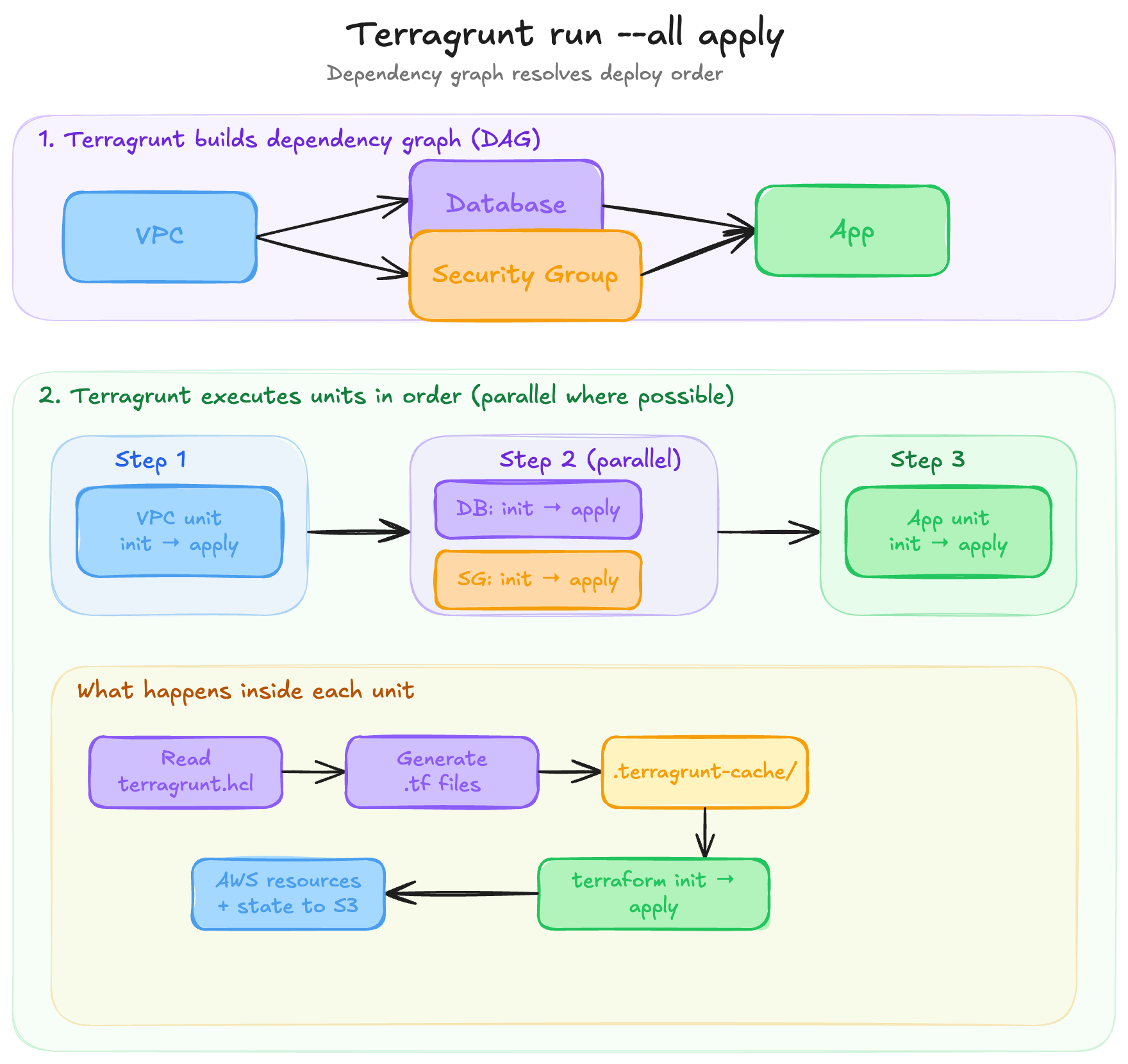
2. Terragrunt core concepts
Before anything else, let’s learn these terms as everything builds on them.
Module (the definition)
A standard Terraform/OpenTofu module, reusable .tf files defining an infrastructure pattern (e.g. a VPC module, a database module). This is the code that describes how to create something. A module is a definition: it says “here’s what a VPC looks like” or “here’s how to set up a database”, but it doesn’t create anything on its own. Terragrunt doesn’t replace modules, but it uses them.
Unit
The most important Terragrunt concept. A unit is a directory containing a terragrunt.hcl file. It’s an instance of a module. It takes a generic module definition and wires it up with specific inputs, backend configuration, and dependencies to produce a concrete piece of infrastructure.
vpc/
  terragrunt.hcl    ← this directory is a "unit".
A terragrunt.hcl file typically says: use this module (via source), pass it these inputs, store its state here, and depend on these other units. The relationship between module and unit is like a class and an object: the module is the reusable pattern, the unit is a specific deployment of that pattern with concrete values.
Units are independently deployable. We can cd into any unit directory and run terragrunt apply directly. When applied, Terraform creates the resources and writes the result to a state file. Each unit gets its own state, which is what makes them independently manageable.
But where does that state file actually live? In most Terragrunt projects, there’s a shared root.hcl file at the top of the repo that configures a remote backend (typically an S3 bucket). Each unit includes that root config, and Terragrunt automatically sets the state file’s path based on the unit’s directory location using the path_relative_to_include() function. So the directory structure in our repo mirrors the state file structure in S3:
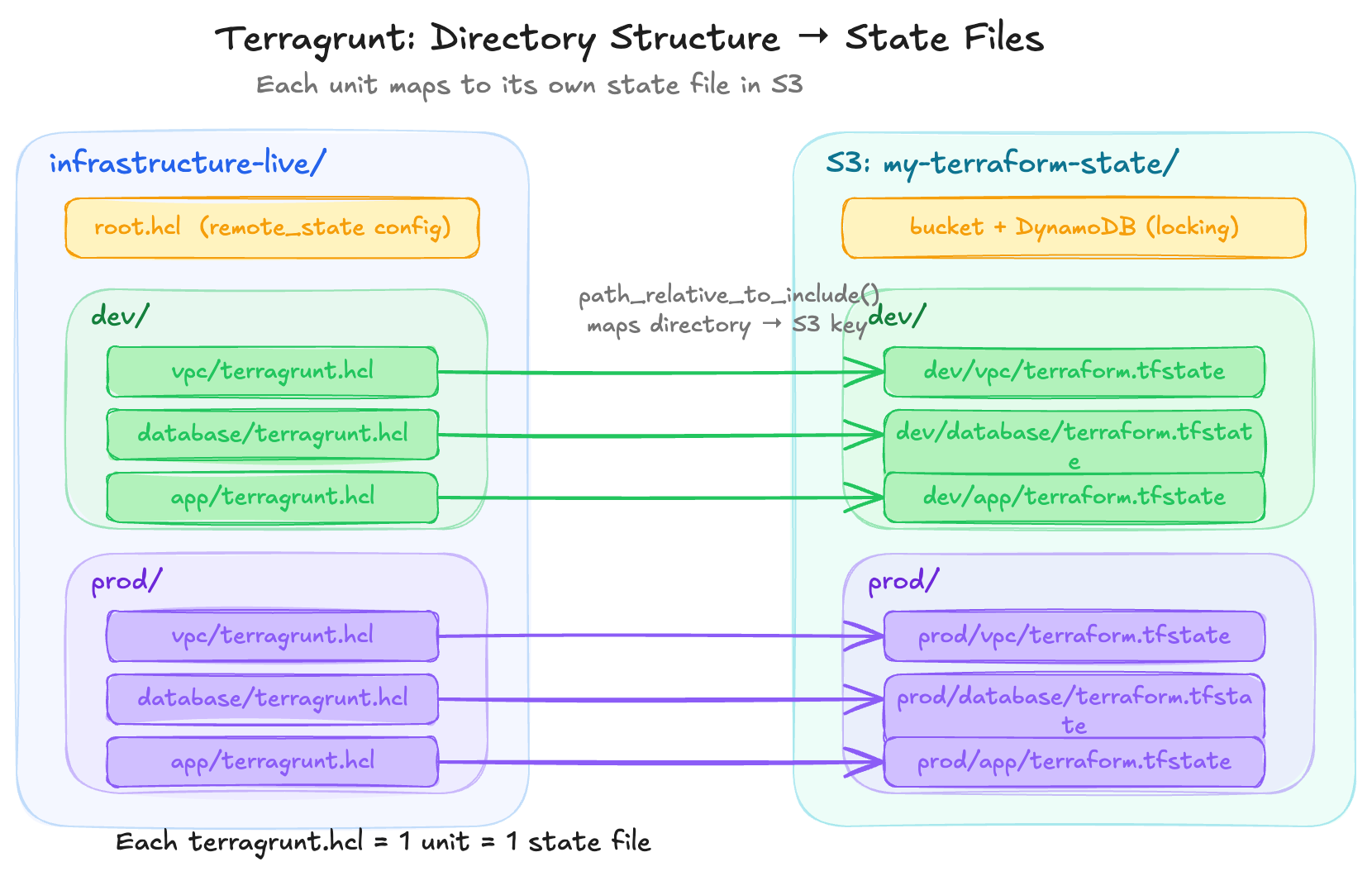
We don’t configure this per unit. The root config handles it once, and every unit that includes it automatically gets a unique state file path.
When we cd live/dev/vpc && terragrunt apply, the state ends up at s3://my-terraform-state/dev/vpc/terraform.tfstate. We’ll cover exactly how this root.hcl and include mechanism works later in this article.
A unit might contain a single resource like an S3 bucket, or a combination of related resources like a Lambda function with its IAM role, S3 trigger, and CloudWatch log group. How granular we go is up to us. The unit is whatever we decide should share a lifecycle and a state file.
That said, Terragrunt’s docs note that teams tend to make units smaller over time. Their reasoning: smaller units mean smaller blast radius, faster plans (a big state file is slow even for a one-line change), independent deploy cadences (the app changes daily, the VPC changes once a year), and cleaner access control boundaries. Gruntwork (the creator of Terragrunt) suggests thinking about what changes together, how often it changes, and who needs access to it, then drawing the unit boundary there.
But going too granular has its own cost; it’s the classic monolith vs microservices tradeoff, applied to infrastructure. More units means more dependency blocks to wire data between them, more init/plan/apply cycles when deploying a stack, more chances for ordering issues and partial failures, and more cognitive overhead to understand what “the app” actually consists of across a dozen directories. A single terraform apply on one state file with 10 resources is faster than 10 separate applies each with 1 resource. Like most architecture decisions, the right answer is somewhere in the middle and depends on our team’s size, deploy frequency, and tolerance for complexity.
Stack
A group of units managed together
Without stacks, every environment needs its own tree of terragrunt.hcl files. Dev has a vpc/terragrunt.hcl, prod has its own vpc/terragrunt.hcl, staging has another, and they’re mostly identical.
A stack is a terragrunt.stack.hcl file that fixes this. We write our unit configs once in a catalog, then each environment gets a single stack file that generates those units with environment-specific values. One file defines a whole environment.
1. Define unit configs in a catalog (separate repo or directory):
These are reusable terragrunt.hcl files — each one references a module and accepts values that can be customized per environment. Think of the catalog as a library of unit templates.
catalog/units/
  vpc/
    terragrunt.hcl      ← reusable unit config
  database/
    terragrunt.hcl
  app/
    terragrunt.hcl
2. Reference them from a stack file:
The terragrunt.stack.hcl file says “I want these units, from this version of the catalog, with these values.” It’s a code generation blueprint; each unit block tells Terragrunt to pull a unit config from the catalog and create a local copy for this environment.
# live/dev/terragrunt.stack.hcl
locals {
  version = "v1.0.0"
}

unit "vpc" {
  source = "git::https://github.com/myorg/catalog.git//units/vpc?ref=${local.version}"
  path   = "vpc"
}

unit "database" {
  source = "git::https://github.com/myorg/catalog.git//units/database?ref=${local.version}"
  path   = "database"
}

unit "app" {
  source = "git::https://github.com/myorg/catalog.git//units/app?ref=${local.version}"
  path   = "app"

  values = {
    instance_type = "t3.small"
    env           = "dev"
  }
}
3. Generate and deploy:
terragrunt stack generate    # fetches catalog, creates unit directories locally

terragrunt stack run apply   # applies all generated units (each gets its own state file)
stack generate pulls the unit configs from the catalog and creates real directories with terragrunt.hcl files (by default under .terragrunt-stack/).
From that point, they’re normal units that we could cd into any of them and run terragrunt apply individually. Each one gets its own state file when applied. The stack file is the code generation blueprint; the generated directories are the actual units.
Adding prod is now just another stack file with different values:
# live/prod/terragrunt.stack.hcl
locals {
  version = "v1.0.0"   # prod can pin a different version than dev
}

unit "vpc" {
  source = "git::https://github.com/myorg/catalog.git//units/vpc?ref=${local.version}"
  path   = "vpc"
}

# ... same structure, different values
Key benefits:
One file per environment instead of a tree of directories
Different environments can pin different versions of the catalog (
ref=v1.0.0vsref=v1.2.0)Easy to roll back an entire environment by changing the
reftagUnit configs are centralized - updating a pattern in the catalog updates it everywhere
Adding a new environment is just creating a new
terragrunt.stack.hclfile
Stack dependency wiring: the rough edges
That covers how stacks work. But there's a practical challenge worth understanding before adopting them: how dependencies between catalog units are wired together
Trade-offs and limitations:
Added abstraction layer; engineers need to run
stack generate(or look at the catalog) to see the full configGenerated
.terragrunt-stackdirectories, which are usually.gitignored, which means the repo doesn’t show the full picture without generationSteeper learning curve for new team members who now need to understand how catalog configs, stack files, and generated units fit together
Dependencies between catalog units are implicit contracts about directory layout (they aren’t validated at creation time)
This is a serious practical challenge with stacks. A catalog unit can’t reference another catalogue unit directly (they’re just blueprints). It can only reference a path where it expects another unit to exist at runtime. That path only becomes real after the stack file generates units into the right places. There are 2 patterns teams use to handle this, and both have fragility issues
Pattern 1 -
find_in_parent_folders: search upward for a known path. The catalog unit doesn't hardcode a relative path. Instead, it searches up the directory tree for a well-known name:# catalog/app-service/terragrunt.hcl dependency "iam_role" { config_path = find_in_parent_folders("team/iam-role") mock_outputs = { role_arn = "arn:aws:iam::000000000000:role/mock-role" } }This is more resilient than a hardcoded relative path like
../../../team/iam-rolebecause it survives directory depth changes; it doesn't matter how many levels deep the unit ends up. But it still assumes that somewhere up the tree, a directory calledteam/iam-roleexists with aterragrunt.hclin it. If that IAM role unit is generated by another stack, that stack must have been generated first. If someone renames or moves it, nothing at authoring time tells us another catalog unit depends on that path, and we’ll find out whenterragrunt planfailsPattern 2 - pass dependency via
valuesThe catalog unit declares its dependencies as inputs, and the stack file provides the actual paths:
 # catalog/units/app-service/terragrunt.hcl
  dependency "ecs_cluster" {
    config_path = values.ecs_cluster_path
    mock_outputs = {
      cluster_arn = "arn:aws:ecs:ap-southeast-2:000000000000:cluster/mock"
    }
  }

  dependency "security_group" {
    config_path = values.security_group_path
    mock_outputs = {
      security_group_id = "sg-00000000"
    }
  }
# live/dev/ap-southeast-2/app/terragrunt.stack.hcl unit "order-service" { source = "${get_repo_root()}/_units/app-service" path = "order-service" values = { ecs_cluster_path = find_in_parent_folders("platform/ecs-cluster") security_group_path = "${local.team_apps}/security-groups/.terragrunt-stack/order-service" } }This is better because all the wiring is visible in one place. The stack file. But look at that
security_group_path: it’s reaching directly into another stack’s.terragrunt-stack/directory. This path depends on:That other stack having been generated already
The unit inside that stack being named exactly
order-service(matching thepathattribute)
If someone renames the unit in the security groups stack, or changes its
pathattribute, we’ll find out when we runterragrunt plan
The core problem: catalog units cannot declare “I depend on another catalog unit” as a first-class concept. They can only declare “I depend on whatever exists at this filesystem path.” The path is a string that points into a directory structure that doesn’t fully exist until all stacks have been generated. This works in practice because teams establish conventions about directory layout, naming, and generation order, but it’s enforced by discipline, not by tooling.
The Terragrunt docs acknowledge this gap: “The dependency block cannot set the value of the config_path attribute to that of a stack. This is functionality that is planned for the future.”
DAG (Directed Acyclic Graph)
How Terragrunt figures out what order to deploy things. If your app depends on your database, and your database depends on your VPC, Terragrunt builds a graph and deploys them in the right order.
4. Our First Terragrunt Project
Steps 1: Installation
# macOS
brew install terragrunt

# Linux (download binary)
# Get the latest from https://github.com/gruntwork-io/terragrunt/releases

# Verify
terragrunt --version
We also need Terraform or OpenTofu installed
Step 2: Start with a Terraform module
Create a simple module:
modules/
  s3-bucket/
    main.tf
    variables.tf
    outputs.tf
# modules/s3-bucket/main.tf
resource "aws_s3_bucket" "this" {
bucket = var.bucket_name
}
# modules/s3-bucket/variables.tf
variable "bucket_name" {
type = string
}
# modules/s3-bucket/outputs.tf
output "bucket_arn" {
value = aws_s3_bucket.this.arn
}Step 3: Create a unit that uses the module
live/
  dev/
    s3-bucket/
      terragrunt.hcl    ← our first unit
# live/dev/s3-bucket/terragrunt.hcl
terraform {
source = "../../../modules/s3-bucket"
}
inputs = {
bucket_name = "my-dev-bucket-12345"
}Step 4: Run it
cd live/dev/s3-bucket
terragrunt plan
terragrunt apply
Terragrunt automatically runs terraform init for us (a feature called Auto-Init), then runs terraform apply with our inputs.
Notice we didn’t write a backend block or provider config. That’s coming next
5. The Root Configuration (DRY Configs)
We’ll quickly notice that every unit needs the same provider config and state backend config. Instead of repeating it, we create a shared root config.
The root.hcl pattern
live/
  root.hcl               ← shared config (NOT a unit)
  dev/
    s3-bucket/
      terragrunt.hcl
    database/
      terragrunt.hcl
  prod/
    s3-bucket/
      terragrunt.hcl
Important: Name it
root.hcl, notterragrunt.hcl. Files namedterragrunt.hclare treated as units. The root config is shared logic, not a deployable unit.
# live/root.hcl

# Configure remote state for ALL units
remote_state {
  backend = "s3"
  generate = {
    path      = "backend.tf"
    if_exists = "overwrite"
  }
  config = {
    bucket         = "my-terraform-state"
    key            = "${path_relative_to_include()}/terraform.tfstate"
    region         = "ap-southeast-2"
    encrypt        = true
    dynamodb_table = "terraform-lock"
  }
}

# Generate provider config for ALL units
generate "provider" {
  path      = "provider.tf"
  if_exists = "overwrite"
  contents  = <<EOF
provider "aws" {
  region = "ap-southeast-2"
}
EOF
}
Including root.hcl in units
# live/dev/s3-bucket/terragrunt.hcl
include "root" {
  path = find_in_parent_folders("root.hcl")
}

terraform {
  source = "../../../modules/s3-bucket"
}

inputs = {
  bucket_name = "my-dev-bucket-12345"
}
find_in_parent_folders("root.hcl") walks up the directory tree until it finds root.hcl. Every unit includes this, so we define state backend and provider config once.
The path_relative_to_include() function in root.hcl automatically generates a unique state key per unit based on its directory path (e.g., dev/s3-bucket/terraform.tfstate).
What generate actually does
Terraform modules need certain .tf files to work, like a provider block to know which cloud to talk to, or a backend block to know where to store state. But we don’t want to hardcode these in every module, because they change between environments (different regions, different accounts, different state paths).
The generate block in root.hcl tells Terragrunt: “before running Terraform, create this .tf file in the working directory.”
generate "provider" {
  path      = "provider.tf"       # filename to create
  if_exists = "overwrite"         # overwrite if it already exists
  contents  = <<EOF
provider "aws" {
  region = "ap-southeast-2"
}
EOF
}
When Terragrunt runs, it copies the module into .terragrunt-cache/, drops provider.tf in there alongside the module’s own .tf files, then runs terraform plan or apply. The module sees the provider as if it was always there.
Because this lives in root.hcl and every unit includes root.hcl, every unit gets the same provider config without any of them defining their own. The remote_state block uses the same mechanism; it generates a backend.tf file.
6. The Terragrunt blocks you'll use everywhere
The inputs Block
How we pass variables to Terraform modules from Terragrunt. Under the hood, Terragrunt sets TF_VAR_ environment variables.
inputs = {
  bucket_name    = "my-bucket"
  enable_logging = true
  tags = {
    Environment = "dev"
  }
}
Inputs don’t have to be hardcoded strings. We can pull values from other sources:
locals {
  env = "dev"
}

dependency "vpc" {
  config_path = "../vpc"
}

inputs = {
  # Hardcoded value
  enable_logging = true

  # From a local variable
  bucket_name = "myapp-${local.env}-assets"

  # From another unit's Terraform output
  vpc_id = dependency.vpc.outputs.vpc_id
}
Each key in inputs must match a variable declared in the Terraform module.
Dependencies Between Units
Units can depend on each other and pass data between them.
# live/dev/app/terragrunt.hcl
include "root" {
  path = find_in_parent_folders("root.hcl")
}

dependency "vpc" {
  config_path = "../vpc"
}

dependency "database" {
  config_path = "../database"
}

terraform {
  source = "../../../modules/app"
}

inputs = {
  vpc_id    = dependency.vpc.outputs.vpc_id
  db_host   = dependency.database.outputs.endpoint
}
Key things about dependencies:
Terragrunt won’t deploy
appuntilvpcanddatabaseare deployeddependency.vpc.outputs.vpc_idreads the Terraform output from the vpc unit’s stateWhen running
terragrunt run --all apply, the DAG ensures correct order
Mock outputs (for plan before dependencies exist)
When we first run plan on a unit, its dependencies might not exist yet. Use mock outputs:
dependency "vpc" {
  config_path = "../vpc"

  mock_outputs = {
    vpc_id = "vpc-mock"
  }

  # Only use mocks during plan and validate — during apply, Terragrunt
  # will require real outputs from the vpc unit. Without this line,
  # mocks are used whenever real outputs aren't available, including
  # during apply, which could deploy infrastructure with fake values.

  mock_outputs_allowed_terraform_commands = ["plan", "validate"]
}
The include Block
Beyond root.hcl, we can create partial configs for groups of similar units.
Multi-level includes
live/
  root.hcl
  _env/
    app.hcl            ← shared config for all "app" units
  dev/
    app/
      terragrunt.hcl
  prod/
    app/
      terragrunt.hcl
# _env/app.hcl
terraform {
source = "git::https://github.com/myorg/modules.git//app?ref=v1.0.0"
}
dependency "vpc" {
config_path = "../vpc"
}
inputs = {
vpc_id = dependency.vpc.outputs.vpc_id
}# live/dev/app/terragrunt.hcl
include "root" {
path = find_in_parent_folders("root.hcl")
}
include "app" {
path = "${dirname(find_in_parent_folders("root.hcl"))}/_env/app.hcl"
expose = true
}
inputs = {
instance_type = "t3.small" # dev-specific override
env = "dev"
}# live/prod/app/terragrunt.hcl
include "root" {
path = find_in_parent_folders("root.hcl")
}
include "app" {
path = "${dirname(find_in_parent_folders("root.hcl"))}/_env/app.hcl"
expose = true
}
inputs = {
instance_type = "t3.small" # dev-specific override
env = "prod"
}Now dev/app and prod/app share the same module source and dependency config, differing only in env-specific inputs.
The locals Block
Same concept as Terraform’s locals. We define reusable variables within a file. The difference is scope: these are available within terragrunt.hcl, not .tf files.
locals {
  env         = "dev"
  aws_region  = "ap-southeast-2"
  name_prefix = "myapp-${local.env}"
}

inputs = {
  bucket_name = "${local.name_prefix}-state"
  region      = local.aws_region
}
A common pattern is reading environment-specific config from HCL files in the directory tree:
# root.hcl
locals {
  account_vars = read_terragrunt_config(find_in_parent_folders("account.hcl"))
  region_vars  = read_terragrunt_config(find_in_parent_folders("region.hcl"))

  account_id = local.account_vars.locals.account_id
  aws_region = local.region_vars.locals.aws_region
}
10. Common Folder Structure
Basic layout
For a simple project with a few environments:
infrastructure-live/              # Our "live" repo
  root.hcl                        # Shared config (state, providers)
  account.hcl                     # Account-level vars (account ID)
  dev/
    region.hcl                    # Region-level vars
    vpc/
      terragrunt.hcl
    database/
      terragrunt.hcl
    app/
      terragrunt.hcl
  prod/
    region.hcl
    vpc/
      terragrunt.hcl
    database/
      terragrunt.hcl
    app/
      terragrunt.hcl

infrastructure-modules/           # Our modules repo
  vpc/
    main.tf
    variables.tf
    outputs.tf
  database/
    main.tf
    variables.tf
    outputs.tf
  app/
    main.tf
    variables.tf
    outputs.tf
Stacks-based layout
As the project grows, Gruntwork recommends splitting into two repos: a catalog repo containing reusable definitions, and a live repo containing only environment-specific stack files. This is based on the official infrastructure-live-stacks-example and infrastructure-catalog-example repos.
The catalog repo contains three layers:
infrastructure-catalog/
  modules/                        # Terraform modules (.tf files)
    ec2-instance/
      main.tf
      variables.tf
      outputs.tf
    rds-database/
      main.tf
      variables.tf
      outputs.tf
    security-group/
      main.tf
      variables.tf
      outputs.tf

  units/                          # Terragrunt units (terragrunt.hcl files)
    app-service/                  # Wires the ec2-instance module
      terragrunt.hcl              # Defines source, dependencies, inputs from values
    database/                     # Wires the rds-database module
      terragrunt.hcl
    security-group/               # Wires the security-group module
      terragrunt.hcl

  stacks/                         # Reusable combinations of units
    web-service/                  # "A web app with its DB and security groups"
      terragrunt.stack.hcl        # Defines unit blocks for app, db, sgs together
The three layers build on each other: modules define the Terraform resources, units wire a module with dependencies and inputs, and stacks compose multiple units into a deployable pattern.
The live repo contains only environment-specific config and stack files:
infrastructure-live/
  root.hcl                        # Shared config (state backend, provider)
  .gitignore                      # Includes .terragrunt-stack

  non-prod/
    account.hcl                   # AWS account ID, account name
    us-east-1/
      region.hcl                  # AWS region
      web-service/
        terragrunt.stack.hcl      # References catalog stack/units at pinned version
    _global/                      # Region-agnostic resources (IAM, Route53)
      iam/
        terragrunt.hcl

  prod/
    account.hcl
    us-east-1/
      region.hcl
      web-service/
        terragrunt.stack.hcl      # Same pattern, different values, maybe different version
    _global/
      iam/
        terragrunt.hcl
The live repo’s stack files are small. They reference the catalog at a pinned version and provide environment-specific values:
# infrastructure-live/prod/us-east-1/web-service/terragrunt.stack.hcl
unit "service" {
  source = "git::git@github.com:acme/infrastructure-catalog.git//units/app-service?ref=v1.2.0"
  path   = "service"
  values = {
    instance_type = "t4g.medium"
    min_size      = 2
    max_size      = 4
    db_path       = "../db"
  }
}

unit "db" {
  source = "git::git@github.com:acme/infrastructure-catalog.git//units/database?ref=v1.2.0"
  path   = "db"
  values = {
    instance_class = "db.t4g.medium"
    db_name        = "prod-web-service"
  }
}
The _global directory is a convention for resources that don’t belong to a specific region (IAM users, Route53 hosted zones, CloudTrail).
Key points:
The catalog repo is versioned with Git tags
The live repo stays lean: just
root.hcl,account.hcl,region.hcl, andterragrunt.stack.hclfilesGenerated
.terragrunt-stackdirectories are.gitignored — CI/CD regenerates themNo Terraform code in the live repo. All
.tffiles live in the catalog
Conclusion
Terragrunt adds a layer on top of Terraform that helps with state isolation, dependency ordering, and config duplication. These are real friction points that grow as infrastructure grows.
But it’s also another tool to learn, maintain, and debug. Some of its features, like stacks, are still maturing. The dependency wiring between catalog units relies on filesystem conventions rather than tooling validation.
Whether it’s the right choice depends on the team and the scale. A small team with a few environments might be fine with vanilla Terraform and some scripts. A platform team managing multiple accounts and services will likely feel the benefit sooner.
I’m still early in my Terragrunt journey, so my opinions here might evolve as I use it more in practice. If you’ve been using Terragrunt, I’d love to hear what’s worked and what hasn’t for your team.